> ## Documentation Index
> Fetch the complete documentation index at: https://felix.so/docs/llms.txt
> Use this file to discover all available pages before exploring further.
# Share
> Share a workflow with others on your team.
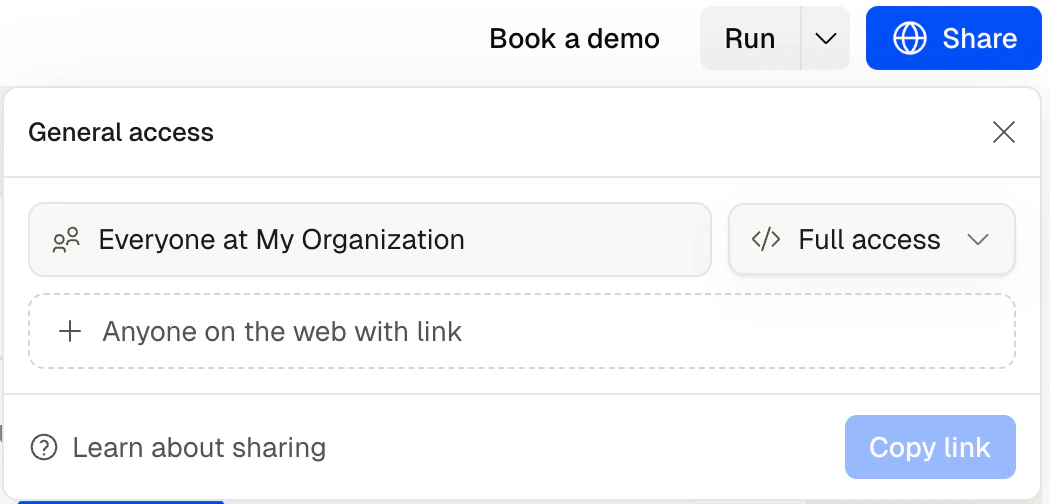
Once your workflow is built and running, you can share it so others can run it, review outputs, or respond to Human Checkpoints — without needing to build anything themselves.
## Sharing a workflow
From the workflow, click **Share**. You can share with:
* **Specific people** — by email address
* **Your whole team** — everyone in your Felix organisation
People you share with can run the workflow and view its outputs. They cannot edit the steps unless you give them edit access.
 ## Permission levels
| Permission | What they can do |
| ---------- | ------------------------------------------- |
| **View** | See the workflow and its run history |
| **Run** | Execute the workflow and view outputs |
| **Edit** | Modify steps and descriptions |
| **Admin** | Full control including sharing and deleting |
Set permissions when sharing or update them any time from the workflow settings.
## Human Checkpoints and shared workflows
If your workflow includes Human Checkpoints, you can assign them to specific people. When execution reaches a checkpoint, Felix notifies the assigned person and waits for their input.
This is useful for approval chains — for example, a paralegal runs the workflow, but a partner reviews and approves before anything is sent.
## Tips
* **Give run-only access by default.** Most people who use a workflow don't need to edit it — run access is enough.
* **Assign Human Checkpoints to the right person.** If a step requires a specific person's sign-off, assign the checkpoint to them directly.
* **Use shared workflows to capture institutional knowledge.** A workflow built once by one person can run for the whole team — without that person needing to be involved each time.
Run manually, on a schedule, or as a batch
Assign review steps to specific people
How workflows are structured
## Permission levels
| Permission | What they can do |
| ---------- | ------------------------------------------- |
| **View** | See the workflow and its run history |
| **Run** | Execute the workflow and view outputs |
| **Edit** | Modify steps and descriptions |
| **Admin** | Full control including sharing and deleting |
Set permissions when sharing or update them any time from the workflow settings.
## Human Checkpoints and shared workflows
If your workflow includes Human Checkpoints, you can assign them to specific people. When execution reaches a checkpoint, Felix notifies the assigned person and waits for their input.
This is useful for approval chains — for example, a paralegal runs the workflow, but a partner reviews and approves before anything is sent.
## Tips
* **Give run-only access by default.** Most people who use a workflow don't need to edit it — run access is enough.
* **Assign Human Checkpoints to the right person.** If a step requires a specific person's sign-off, assign the checkpoint to them directly.
* **Use shared workflows to capture institutional knowledge.** A workflow built once by one person can run for the whole team — without that person needing to be involved each time.
Run manually, on a schedule, or as a batch
Assign review steps to specific people
How workflows are structured